

散热器模拟
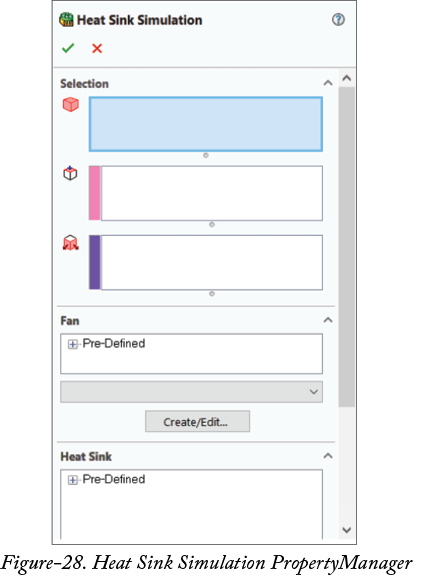
Heat Sink Simulation 工具用于模拟散热器对选定部件的影响。使用该工具的步骤如下。
-
从
Tools>Flow Simulation>Insert> 菜单中,或从功能区中的Sources下拉列表中单击Heat Sink Simulation工具。将显示Heat Sink Simulation属性管理器;请参阅图 28。 -
默认情况下,
Components to Apply the Heat Sink选择框处于活动状态,因此请选择要应用散热器的部件。 -
单击
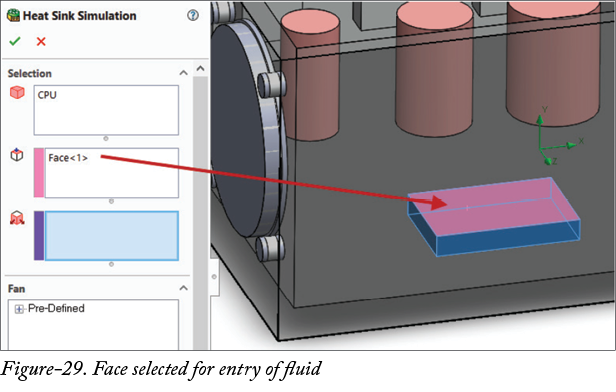
Faces Fluid Enters the Heat Sink选择框,并选择流体(空气或气体)进入的面;请参阅图 29。 -
单击
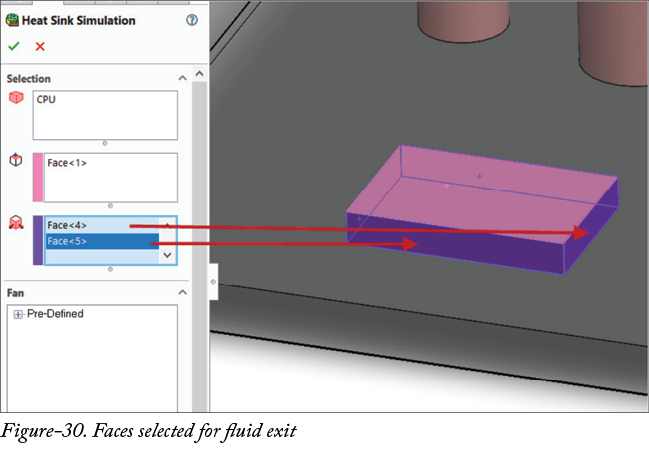
Faces Fluid Exits the Heat Sink选择框,并选择流体(空气或气体)流出的面;请参阅图 30。
-
展开
Fan节点,并从列表中选择所需风扇。 -
从属性管理器的
Heat Sink部分中选择所需散热器。 -
在属性管理器的
Source部分的Heat Generation Rate编辑框中指定源产生的热量。 - 单击 OK 按钮以应用散热器参数。